OCXLY
OcxlyDev · Engineering · 11 min read

10 modern CSS features that replaced JavaScript in our codebase

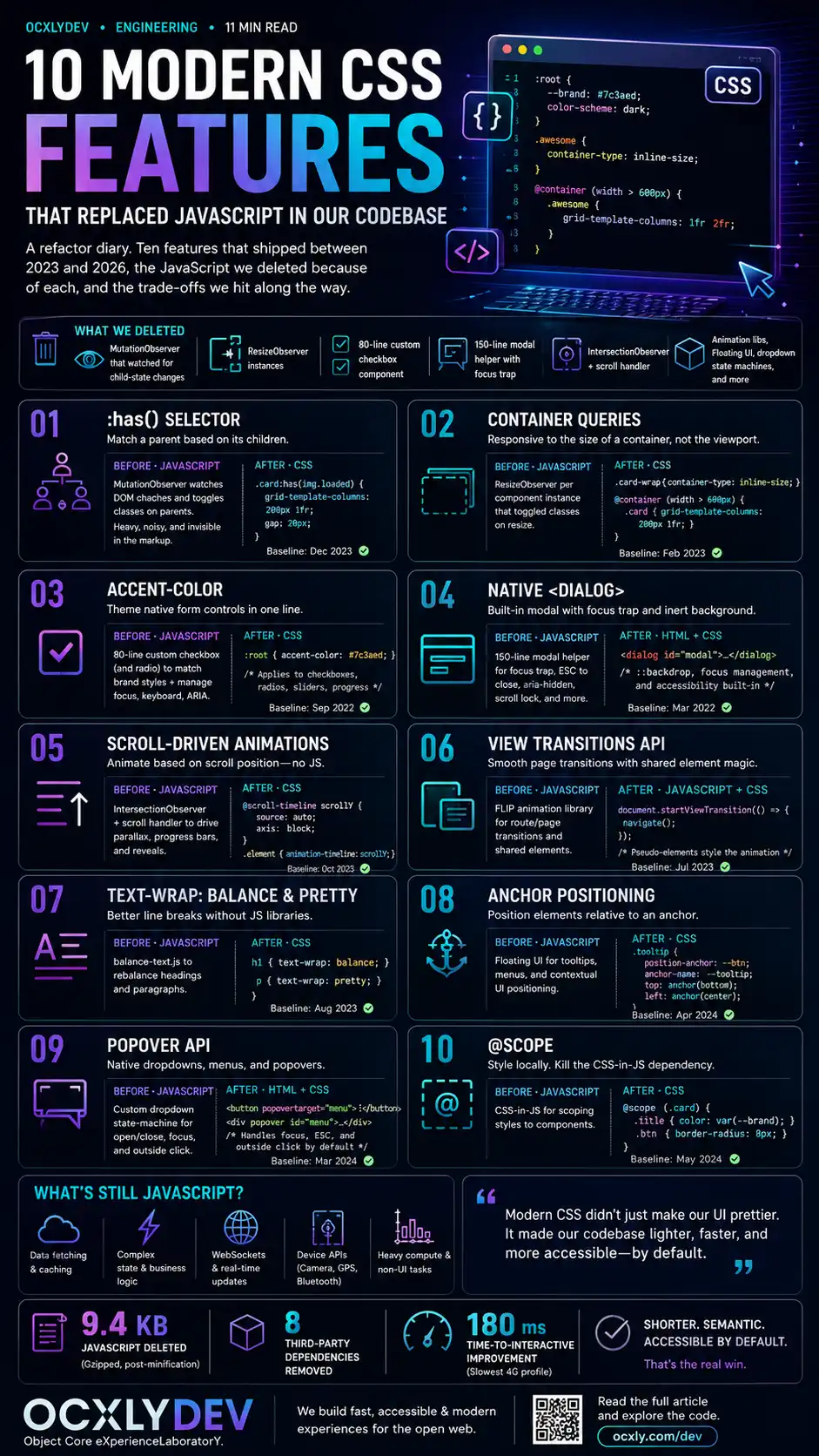
A refactor diary. Ten features that shipped between 2023 and 2026, the JavaScript we deleted because of each, and the trade-offs we hit along the way.

Reading mode
10 modern CSS features that replaced JavaScript

Modern CSS has crossed a threshold. Features that shipped quietly between 2023 and 2026 have, collectively, eliminated entire categories of JavaScript from our codebase — focus traps, ResizeObservers, balance-text libraries, Floating UI, IntersectionObservers for scroll effects, custom modal implementations. We didn't set out to do a JavaScript-deletion audit; it happened gradually as each feature crossed the Baseline threshold of "available in all evergreen browsers"[11].

This is the audit. Ten features, the JavaScript we deleted because of each, and what we kept JS for anyway. Every feature below ships in current Chrome, Firefox, and Safari as of mid-2026; where a feature still has gaps, we say so explicitly. None of this is bleeding edge — most have been stable for at least 12 months.

The net effect across the OCXLY codebase: roughly 9.4 KB of JavaScript deleted (gzipped, post-minification), eight third-party dependencies removed, and a Time-to-Interactive improvement of about 180ms on the slowest 4G profile. More important than the numbers: the code that remains is shorter, more semantic, and significantly more accessible by default.

01

The :has() selector

What it does

The "parent selector" that the CSS Working Group spent twenty-three years saying was impossible[1]. :has() matches an element if any of its descendants match the inner selector. .card:has(img) matches every card that contains an image. form:has(input:invalid) matches every form with at least one invalid input. Universally available in evergreen browsers since December 2023.

What we deleted

A MutationObserver that watched the entire body subtree, toggling classes on parent elements whenever their children's state changed. It worked, but it ran on every DOM mutation in the document, and its semantics were invisible from the markup.

Before · JavaScript
// Watch every card; toggle a class
// if it contains a loaded image.
const ro = new MutationObserver(() => {
  document.querySelectorAll('.card')
    .forEach(c => {
      c.classList.toggle(
        'has-image',
        !!c.querySelector('img.loaded')
      );
    });
});
ro.observe(document.body, {
  subtree: true,
  attributes: true,
  attributeFilter: ['class']
});
After · CSS
/* One selector. Zero JavaScript. */
.card:has(img.loaded) {
  grid-template-columns: 200px 1fr;
  gap: 20px;
}

/* Bonus: form-level validation styling */
form:has(input:invalid) .submit-btn {
  opacity: 0.5;
  pointer-events: none;
}
Browser support: Baseline since December 2023. Performance is excellent in current engines; pathological selectors that match across very large DOM trees are the only thing to watch.
02

Container queries

What it does

Responsive design based on the size of a containing element, not the viewport[2]. A card placed in a 600px sidebar can lay out compactly; the same card in a 1200px main column expands. Without container queries, the only sizing context CSS had was the viewport — a constraint that hadn't matched how we actually built component-driven UI for at least a decade.

What we deleted

A ResizeObserver for every component instance that needed responsive internal layout. Each observer triggered class toggles on its target. Performance was fine; the maintenance cost wasn't.

Before · JavaScript
// One observer per card instance.
const ro = new ResizeObserver(entries => {
  entries.forEach(e => {
    const w = e.contentRect.width;
    e.target.classList.toggle('compact', w < 320);
    e.target.classList.toggle('wide', w > 600);
  });
});
document.querySelectorAll('.card')
  .forEach(c => ro.observe(c));
After · CSS
.card-wrap { container-type: inline-size; }

@container (width < 320px) {
  .card { padding: 12px; font-size: 14px; }
}
@container (width > 600px) {
  .card {
    display: grid;
    grid-template-columns: 200px 1fr;
  }
}
Browser support: Baseline since February 2023. Use cqi / cqw units inside container queries for proportional sizing — they're worth learning.
03

accent-color

What it does

Themes the user-agent default styling of checkboxes, radio buttons, range sliders, and progress bars — without rebuilding any of them[3]. One declaration on :root propagates to every native form control on the page.

What we deleted

An ~80-line custom checkbox component (and an essentially identical radio component) that existed solely to make form controls match the brand. It had its own focus state, keyboard handlers, ARIA attributes, hidden native input — the entire weight of reimplementing semantics the browser already gave us.

Before · custom component
// ~80 lines: a custom checkbox with
// hidden native input, SVG check icon,
// focus styles, keyboard handlers, ARIA.
// Plus dependency: clsx for class merging.

function BrandCheckbox({ checked, ... }) {
  // ... 80 lines ...
}
After · one CSS line
:root {
  accent-color: var(--cyan);
}

/* Every native <input type="checkbox">,
   <input type="radio">, <input type="range">,
   and <progress> now uses the brand colour. */
Browser support: Baseline since 2022. Limit: you can theme the accent colour but not the surrounding control box; for that you still need a custom component, but most teams don't actually need one.
04

Native <dialog>

What it does

A real modal element with focus trapping, ESC-to-close, backdrop styling, top-layer rendering, and form integration via method="dialog"[4]. The 2024 addition of the closedby attribute and improved ::backdrop styling finally made it a complete replacement.

What we deleted

A 150-line modal helper. It managed focus traps, captured the previously-focused element, locked body scroll, listened for the Escape key, handled backdrop clicks, and managed ARIA attributes. Every line of it now lives in the browser.

Before · JavaScript
// ~150 lines: focus trap, scroll lock,
// escape handler, backdrop click,
// focus restoration, ARIA wiring.

function openModal(el) {
  trapFocus(el);
  lockBodyScroll();
  attachEscapeHandler(el);
  // ... a lot more ...
}
After · HTML + 1 line of JS
<!-- markup -->
<dialog id="contact" closedby="any">
  <h2>Contact us</h2>
  <form method="dialog">
    <button>Close</button>
  </form>
</dialog>

// JS
contact.showModal();
Browser support: Element baseline since 2022; closedby="any" attribute and improved ::backdrop animation in all evergreen engines since late 2024.
05

Scroll-driven animations

What it does

CSS animations whose timeline is the scroll position of an element — either the page (scroll()) or an element's visibility within the viewport (view())[5]. No JavaScript event loop, no thrashing on rapid scroll, no requestAnimationFrame coordination.

What we deleted

An IntersectionObserver wired to a scroll-throttled handler that set inline styles on elements as they entered the viewport. It worked. It was also one of the largest sources of jank in our codebase, particularly on Safari iOS during momentum-scroll.

Before · JavaScript
const io = new IntersectionObserver(
  entries => entries.forEach(e => {
    e.target.style.opacity = e.intersectionRatio;
    e.target.style.transform =
      `translateY(${(1 - e.intersectionRatio) * 40}px)`;
  }),
  { threshold: Array.from(
      {length: 21},
      (_, i) => i / 20
  )}
);
document.querySelectorAll('.reveal')
  .forEach(el => io.observe(el));
After · CSS
.reveal {
  animation: fade-in linear both;
  animation-timeline: view();
  animation-range: entry 0% cover 30%;
}

@keyframes fade-in {
  from {
    opacity: 0;
    transform: translateY(40px);
  }
  to {
    opacity: 1;
    transform: translateY(0);
  }
}
Browser support: Chrome and Edge since 2023; Safari shipped view() support in 2025; Firefox followed. Wrap with @supports (animation-timeline: view()) for a clean fallback if you support older WebKit.
06

View Transitions API

What it does

An automatic crossfade between two DOM states, plus a hook for animating individually-named elements that exist on both sides of the transition[6]. Single-page transitions shipped in 2023; cross-document (MPA) transitions followed in 2024 — meaning your static HTML site can now have smooth route transitions without becoming an SPA.

What we deleted

A FLIP-style animation library that measured element positions before and after a DOM update, then applied transforms to animate between them. It was good. It was also 4 KB of JavaScript and didn't handle text reflow gracefully.

Before · JavaScript
// FLIP animation library
// Measure → mutate → measure → animate.
// ~80 lines + edge cases for reflow,
// text wrapping, removed elements.

flipAnimate('.card', () => {
  updateCards();
});
After · CSS + 1 wrapper
/* Per-element naming */
.card { view-transition-name: var(--card-id); }

// JS wrapper
function update() {
  if (!document.startViewTransition) {
    return updateCards();
  }
  document.startViewTransition(updateCards);
}
Browser support: Single-page transitions baseline since 2024. Cross-document transitions shipping progressively through 2025–2026 — the @view-transition rule activates them on a static site with no JS at all.
07

text-wrap: balance and pretty

What it does

balance distributes words evenly across lines in short text (headings, captions). pretty applies a less expensive algorithm for long-form body text that primarily prevents orphans — single words alone on the last line[7].

What we deleted

The balance-text.js library. Roughly 1.2 KB minified. It worked by repeatedly setting widths and measuring overflow on resize — a classic case of JavaScript doing layout work that belongs to the browser.

Before · JavaScript
import balanceText from 'balance-text';
balanceText('.hero-title');
window.addEventListener('resize', () =>
  balanceText('.hero-title')
);
After · CSS
.hero-title  { text-wrap: balance; }
.article-body p { text-wrap: pretty; }
Browser support: balance baseline since 2023; pretty in all engines by 2025. The browser limits balance to short text (typically 6 lines or fewer) to keep layout costs reasonable — exactly where you want it.
08

CSS Anchor Positioning

What it does

Position one element relative to another, declaratively, in CSS — with automatic flipping when there isn't room and fallback positions when the primary one doesn't fit[8]. The thing every tooltip and dropdown library has been hand-rolling for fifteen years.

What we deleted

Floating UI (the modern Popper successor). Excellent library, but 4.6 KB gzipped for a tooltip and a few dropdowns. Calculation ran in JavaScript on every scroll and resize — fine until you had thirty tooltips on a page.

Before · JavaScript
import { computePosition, flip, shift, offset }
  from '@floating-ui/dom';

computePosition(btn, tooltip, {
  placement: 'bottom-start',
  middleware: [offset(8), flip(), shift()]
}).then(({x, y}) => {
  Object.assign(tooltip.style, {
    left: `${x}px`,
    top:  `${y}px`
  });
});
After · CSS
.btn { anchor-name: --btn-1; }

.tooltip {
  position: absolute;
  position-anchor: --btn-1;
  top:  anchor(bottom);
  left: anchor(start);
  margin-top: 8px;
  position-try-fallbacks: flip-block, flip-inline;
}
Browser support: Chrome and Edge baseline since 2024; Safari and Firefox shipped through 2025. Use @supports with a JS fallback if you need 2023-era browser parity.
09

The Popover API

What it does

An HTML attribute (popover) that turns any element into a top-layer popup, plus an attribute (popovertarget) on any button that opens it[9]. Click outside to dismiss, ESC to close, light vs auto vs manual modes — all built in.

What we deleted

The dropdown state machine. Click-outside-to-close listener. Escape-key listener. Focus-on-open. Focus-return-on-close. ARIA toggles. Mobile tap-outside handling. Each piece small; together substantial.

Before · JavaScript
let open = false;
trigger.addEventListener('click', () => {
  open = !open;
  menu.toggleAttribute('data-open', open);
});
document.addEventListener('click', e => {
  if (open && !menu.contains(e.target)
       && e.target !== trigger) {
    open = false;
    menu.removeAttribute('data-open');
  }
});
document.addEventListener('keydown', e => {
  if (e.key === 'Escape' && open) close();
});
After · HTML
<button popovertarget="menu">
  Open menu
</button>

<div id="menu" popover>
  <a href="/profile">Profile</a>
  <a href="/settings">Settings</a>
</div>
Browser support: Baseline since April 2024. Combine with anchor positioning for menus that flip correctly near viewport edges.
10

@scope

What it does

Native CSS scoping, with a defined upper bound and an optional lower bound[10]. Rules inside @scope (.card) only apply within .card, and stop at the next .card descendant if you want them to. No build step. No naming convention.

What we deleted

One CSS-in-JS dependency used purely for component scoping. The replacement isn't a literal one-to-one — CSS-in-JS does more than scoping — but the scoping itself moved into the platform, which removed the strongest case for keeping the dependency on this codebase.

Before · CSS-in-JS
// styled-components, emotion, or similar.
// Build step. Runtime overhead.
// Bundle weight.

const Card = styled.div`
  padding: 1rem;
  h2 { font-size: 1.5rem; }
  p  { color: #666; }
`;
After · native CSS
@scope (.card) {
  :scope { padding: 1rem; }
  h2 { font-size: 1.5rem; }
  p  { color: #666; }
}

/* Optional lower bound — rules stop
   when they hit a nested .card */
@scope (.card) to (.card .card) {
  /* ... */
}
Browser support: Chrome and Safari shipped in 2023–2024; Firefox in 2025. As of mid-2026 it's safe in evergreen browsers; for older Firefox builds, the styles still apply globally, which is rarely catastrophic.

What's still JavaScript

This list is not "CSS replaced everything." Several things stayed in JavaScript on purpose:

State synchronisation. Reactivity, store subscriptions, computed values — the actual application logic. CSS isn't trying to do this and shouldn't.

Complex form validation. CSS can style invalid inputs; it can't tell you whether two passwords match, run an async username check, or coordinate multi-field rules. :has(input:invalid) helped with surface-level styling, but the validation itself is still application code.

Drag and drop. Native DnD still leaves the door open for libraries; we kept ours.

What the audit revealed, more than any specific deletion, is that a lot of JavaScript exists because CSS used to be missing the feature. The tooltip libraries, the modal libraries, the focus-trap libraries, the scroll-animation libraries — they're all polyfills for primitives the platform didn't have. As the platform fills in, the libraries become honest dependencies again: things you pull in when you genuinely need them, not things you pull in because the alternative was impossible.

If you've never audited your codebase for "what would I delete if I started fresh in 2026?", it's worth doing. Ours wasn't a rewrite — it was a slow series of three- and four-file PRs, each making a tiny corner of the code more semantic. Together: 9 KB lighter, 8 dependencies fewer, and a more accessible site by default[12].

References

  1. W3C. (2024). CSS Selectors Level 4 — :has() pseudo-class. w3.org/TR/selectors-4/#has-pseudo
  2. W3C. (2024). CSS Containment Module Level 3 — Container Queries. w3.org/TR/css-contain-3. Una Kravets' introduction at web.dev/blog/cq-stable remains the clearest walkthrough.
  3. W3C. (2023). CSS Basic User Interface Module Level 4 — accent-color. w3.org/TR/css-ui-4/#widget-accent
  4. WHATWG. (2025). HTML Living Standard — The dialog element. html.spec.whatwg.org/multipage/interactive-elements.html#the-dialog-element. See also Hidde de Vries on closedby: MDN — HTMLDialogElement: closedBy
  5. W3C. (2024). CSS Scroll-driven Animations Module Level 1. w3.org/TR/scroll-animations-1. Bramus Van Damme's primer: developer.chrome.com/articles/scroll-driven-animations
  6. W3C. (2024). CSS View Transitions Module Level 1 (same-document) and Module Level 2 (cross-document). w3.org/TR/css-view-transitions-1 · Jake Archibald's introduction: developer.chrome.com/docs/web-platform/view-transitions
  7. W3C. (2023). CSS Text Module Level 4 — text-wrap property. w3.org/TR/css-text-4/#text-wrap. Adam Argyle on balance vs pretty: developer.chrome.com/blog/css-text-wrap-balance
  8. W3C. (2024). CSS Anchor Positioning Module Level 1. w3.org/TR/css-anchor-position-1. Una Kravets' overview: developer.chrome.com/blog/anchor-positioning-api
  9. WHATWG / Open UI Community Group. (2024). HTML — The popover attribute. html.spec.whatwg.org/multipage/popover.html. Open UI's design rationale: open-ui.org/components/popover.research.explainer
  10. W3C. (2024). CSS Cascading and Inheritance Level 6 — @scope. w3.org/TR/css-cascade-6/#scope-atrule
  11. Web Platform Status. (2026). Baseline — features available in all current evergreen browsers. web-platform-dx.github.io/web-features · Baseline is the data source MDN uses for "Widely available" / "Newly available" badges.
  12. Web Almanac. (2025). HTTP Archive — CSS chapter. Annual analysis of CSS usage across 13 million websites; data on adoption rates of the features above is at almanac.httparchive.org/en/2024/css