The 2026 hardware reality check: what it takes to run local LLMs
You no longer need an expensive graphics card to run a language model at home. A handful of ideas do the heavy lifting: 4-bit quantization, unified memory, Mixture-of-Experts, and the one everyone forgets — the KV cache. This piece is the simple math behind what you can actually run.

A common assumption is that running a language model locally requires a high-end NVIDIA GPU. That used to be true. It is much less true now, mostly because of a few practical changes: quantization, which shrinks a model's memory footprint; unified memory, which lets some machines use ordinary RAM as GPU memory; and Mixture-of-Experts, which lets a large model run at the speed of a small one. There is also a memory cost most guides skip — the KV cache that grows with your context window. Once you understand how these affect memory, most of the hardware questions answer themselves. This is the updated 2026 map, including the new class of 128 GB unified-memory AI desktops that landed this year.
01How much memory a model needs
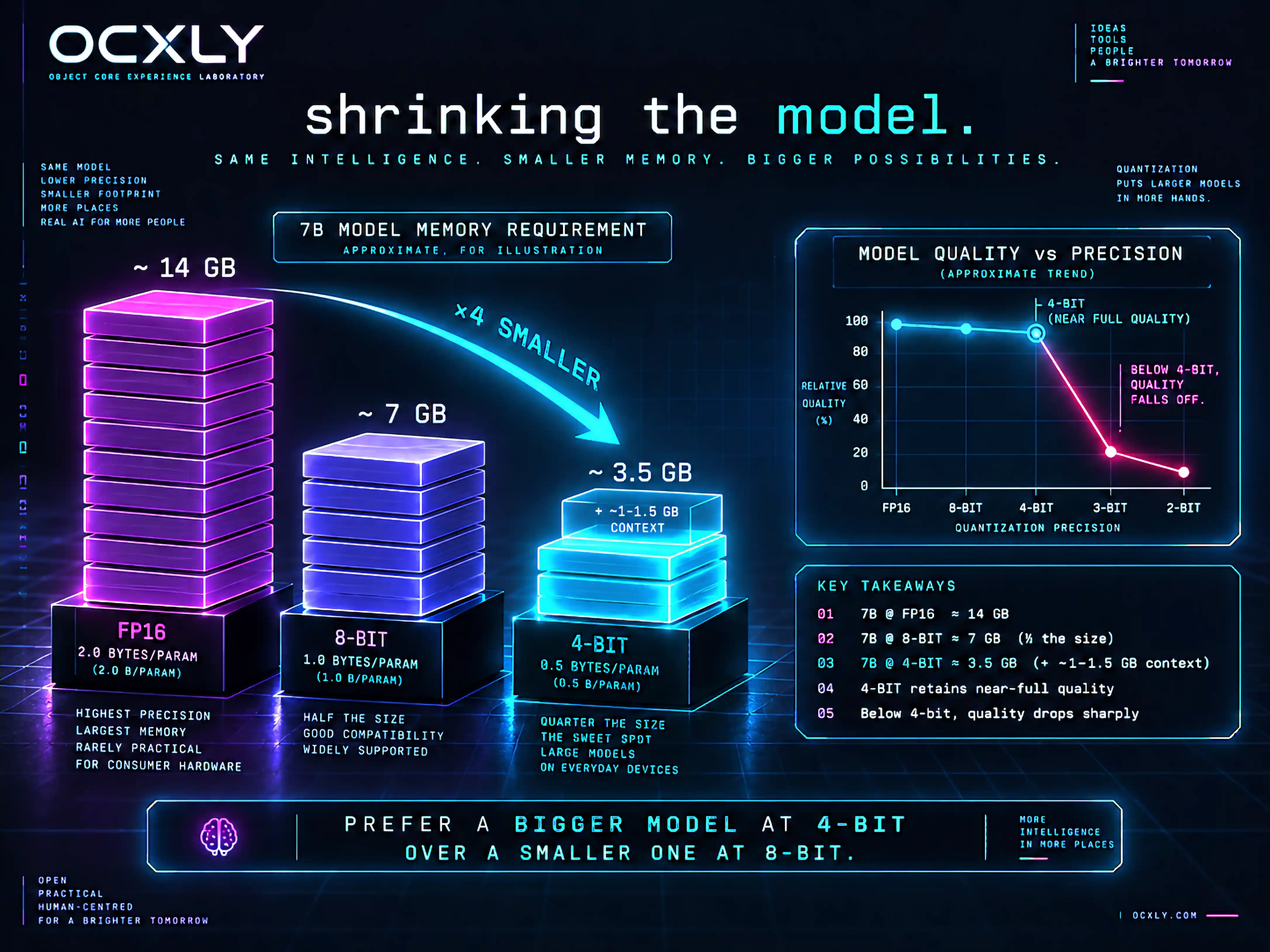
Most hardware questions come down to memory, and a rough rule works well: a model needs about its parameter count multiplied by the number of bytes used per parameter, plus some extra for context. At full 16-bit precision each parameter takes 2 bytes, so a 7-billion-parameter model needs roughly 14 GB just for its weights.1 That number is what makes local models sound out of reach. The next few sections are why they usually are not — and one section is why they are sometimes larger than the formula suggests.
# Memory for weights ≈ parameters × bytes-per-parameter (+ KV cache for context)
# FP16 : 2.0  bytes/param  ->  7B ≈ 14 GB
# 8-bit: 1.0  byte/param   ->  7B ≈  7 GB
# 4-bit: 0.5  byte/param   ->  7B ≈  3.5 GB  (+ ~1-1.5 GB context ≈ ~5 GB)
One thing worth internalising early, because it decides which hardware matters: local inference is memory-bandwidth-bound, not compute-bound. Generating each token means reading the whole active model out of memory once, so the speed you feel is set far more by how fast your memory is than by how many teraflops the chip claims.3 Keep that in mind — it explains why a laptop with fast unified memory can out-feel a desktop with a bigger, slower one.
02Quantization: shrinking the weights
Quantization stores each weight at lower precision, most commonly 4-bit integers instead of 16-bit floating point. Moving from 16-bit to 4-bit reduces size by about 4× (roughly 75%), and the common Q4_K_M format from llama.cpp is a popular default because it makes that reduction with only a small drop in quality.2 In practice, that is what lets a 7B model that wanted 14 GB run in about 5 GB, and a 14B model fit inside a 12 GB GPU.2 You give up a little accuracy for a large memory saving, and for most local use that trade is worth making.
There is a floor, though. Around 4-bit is the sweet spot; drop to 3-bit or 2-bit and quality falls off a cliff, especially on reasoning and code, so the memory you save is rarely worth it. If you have headroom, Q5_K_M or Q6_K claw back a little quality for a little more size. The practical rule: prefer a bigger model at 4-bit over a smaller model at 8-bit when they use the same memory — the larger model almost always wins.2
03The part everyone forgets: context and the KV cache
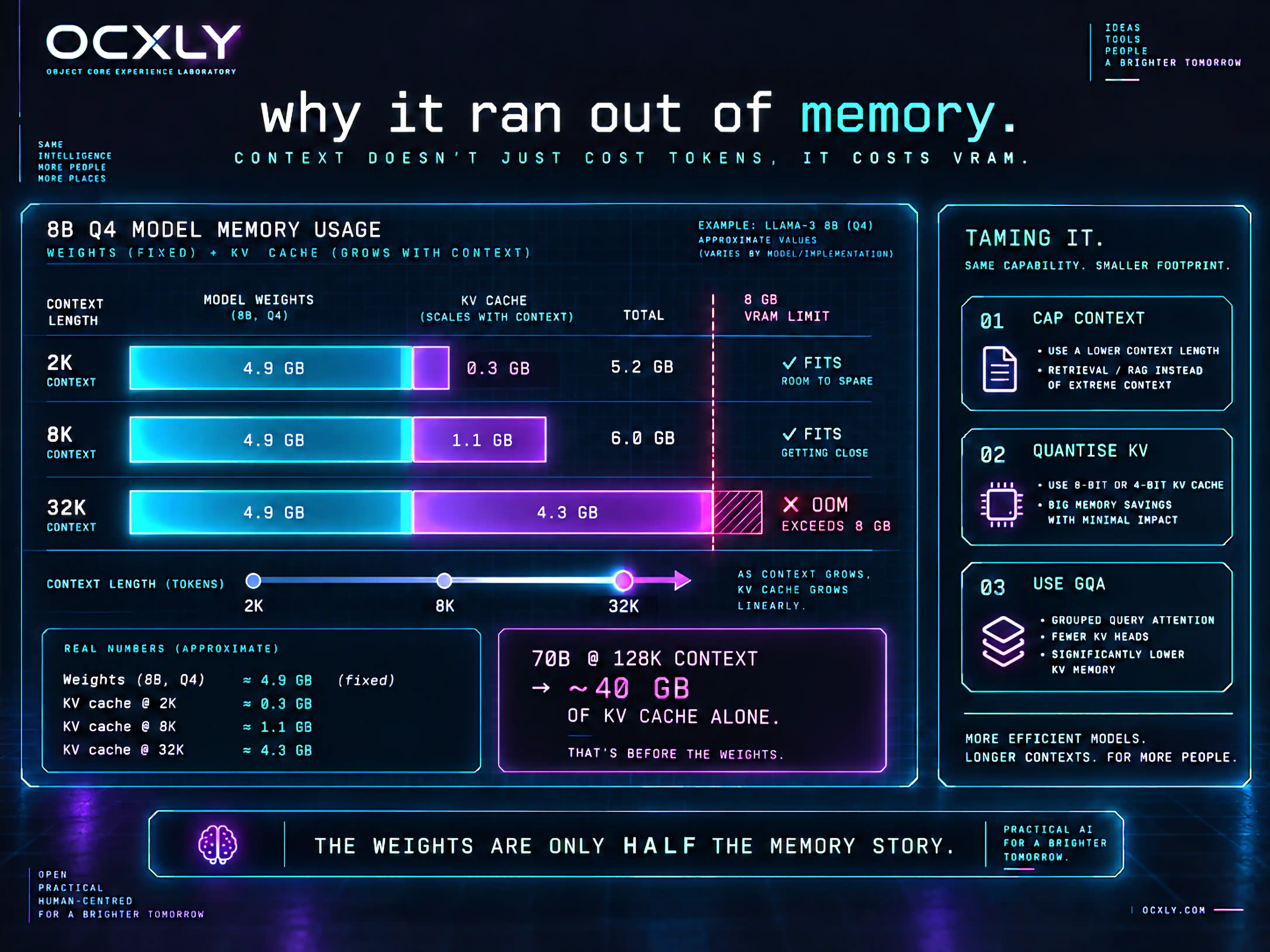
The weights are only half the memory story. As the model reads your prompt and generates a reply, it stores a running summary of every token so far — the KV cache (key–value cache) — and that cache grows linearly with context length.6 On a short prompt it is negligible. On a long one it can rival or exceed the weights themselves, and it is the single most common reason a model that "should fit" suddenly runs out of memory.
The numbers are startling once you look. A Llama-3.1 8B model at Q4_K_M takes about 4.9 GB for weights — but at a 32K-token context the KV cache adds roughly 4.3 GB on top, nearly doubling total usage past 9 GB.6 Push a 70B model to a 128K context and the KV cache alone can need on the order of 40 GB, separate from the weights.6 This is why "how much context do you need?" is a hardware question, not just a software setting.
04Mixture-of-Experts: big models that run light
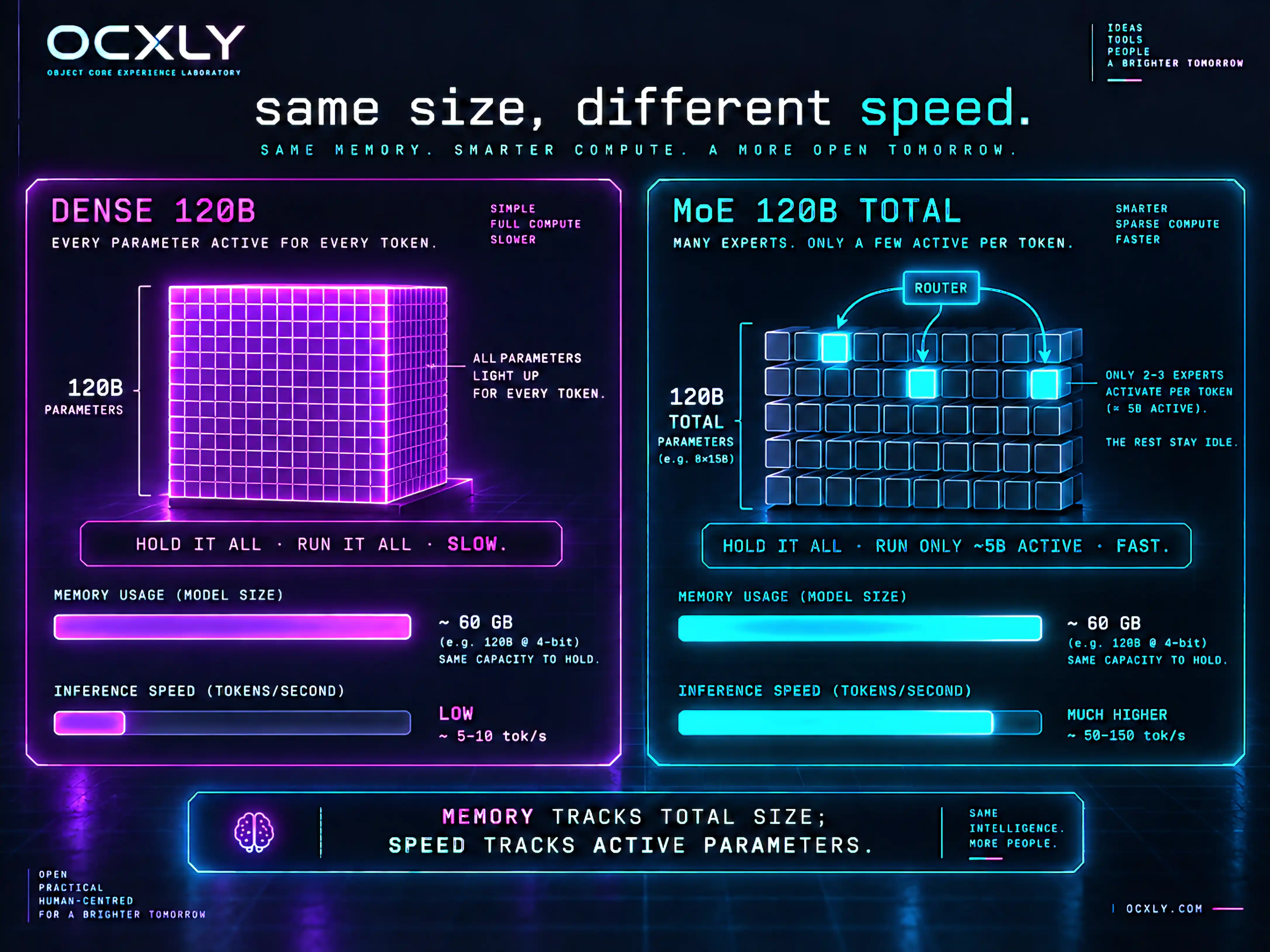
The formula in section 01 assumes every parameter is used for every token. Mixture-of-Experts (MoE) models break that assumption. They contain many "expert" sub-networks but activate only a few per token, so a model with, say, 120B total parameters might use only ~5B active parameters on each step.7 The consequence is a useful split: you still need enough memory to hold all the parameters, but the speed tracks only the active ones.
That is why MoE has quietly reshaped local hardware. Open MoE models like the gpt-oss family and Qwen3's MoE variants run far faster than their total size implies — a ~120B MoE can decode at speeds a 120B dense model never could, because only a slice of it runs per token.7 For a high-memory machine, MoE is the difference between "can technically load it" and "actually usable." It rewards capacity (to hold the model) over raw compute — exactly the profile of unified-memory hardware.
Dense models ask "can your memory hold it and your bandwidth feed all of it?" MoE asks only "can your memory hold it?" — then runs at the speed of the small slice it actually uses.
05VRAM versus unified memory
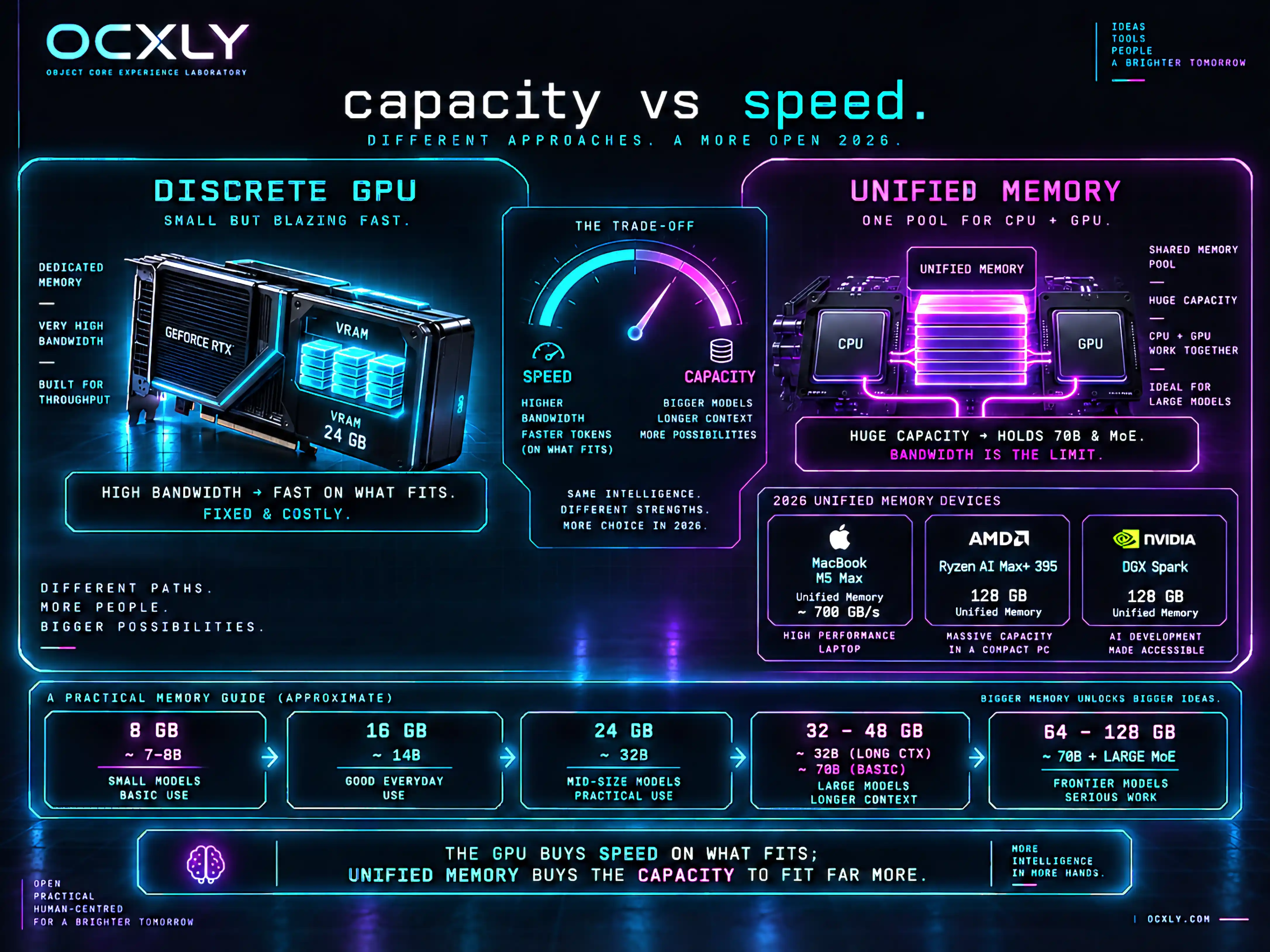
A discrete NVIDIA GPU stores the model in its own dedicated VRAM. That memory is very fast, but it is fixed in size and expensive, and a model that does not fit in VRAM will not load. Apple Silicon (M-series) uses unified memory instead: a single pool of RAM that the CPU, GPU, and Neural Engine all access directly, without copying data across a PCIe bus.3 Because that pool is the machine's full RAM, a Mac with 64 or 128 GB can load models that will not fit in the VRAM of any consumer GPU at a reasonable price.
There is a real trade-off, and it comes back to bandwidth. A high-end discrete GPU has enormous memory bandwidth, so it generates tokens faster on models that do fit in its VRAM.4 Apple has been closing the gap from the capacity side: an M5 Max pairs up to 128 GB of unified memory with roughly 600–700 GB/s of bandwidth, enough to run 70B-class and large MoE models on a laptop at genuinely usable speeds.3 The GPU buys speed on what fits; unified memory buys the capacity to fit far more.
06The new category: 128 GB unified-memory AI desktops
The biggest 2026 change is a whole new hardware class: small desktop "AI boxes" built around large unified-memory pools, aimed squarely at local models too big for a consumer GPU. Two define the category. AMD's Ryzen AI Max+ 395 ("Strix Halo") pairs Zen 5 cores with a big integrated Radeon GPU and up to 128 GB of unified LPDDR5X, most of which can be addressed as VRAM — enough to hold a 70B model at 4-bit with room for context, at around $2,000 in mini-PC form.8 NVIDIA's DGX Spark targets the same 128 GB unified footprint and can hold models up to roughly 200B parameters at FP4.9
The catch is the one section 05 predicted: these boxes have server-class memory capacity but far less compute bandwidth than a data-centre GPU. On a large model, Strix Halo's prompt-processing (prefill) can be several times slower than a dedicated NVIDIA AI box even when their token-generation (decode) speeds are close, because its integrated GPU has less raw throughput and its ~256 GB/s memory bandwidth is a fraction of a discrete card's.8 They are a genuinely new option — run big models at your desk without a data-centre budget — as long as you accept slower prefill on long prompts.
07Bandwidth is speed
Because inference is memory-bandwidth-bound, the number that predicts tokens-per-second is memory bandwidth, not core count. A rough intuition: divide your memory bandwidth by the size of the active model, and you get a ceiling on tokens per second. A 4-bit 30B model (~18 GB) on ~700 GB/s of bandwidth tops out somewhere in the tens of tokens per second; the same model on a 256 GB/s unified pool runs proportionally slower even if it fits comfortably.3 This is also why MoE feels fast: the "active model" in that division is small.
Two speeds matter and they behave differently. Prefill (reading your prompt) is compute-heavy and rewards a strong GPU; decode (writing the reply) is bandwidth-bound and rewards fast, wide memory. A machine can be great at one and mediocre at the other — which is exactly the story of the new unified-memory desktops: good decode, weaker prefill.8
08A buyer's guide by memory tier
Since it comes back to memory, you can choose hardware by tier. These assume 4-bit models with a few gigabytes left for the KV cache — budget more if you want long context:
- 8 GB (VRAM or unified) — runs 7–8B models at 4-bit (Qwen3 8B, Mistral 7B, Phi-4-mini) with short-to-moderate context. Enough for a useful local assistant and coding helper.5
- 16 GB — runs 14B-class models at 4-bit with room to spare, or an 8B model at long context. A good target for most people.
- 24 GB — runs about 32B models at 4-bit, where local quality starts to feel strong, and small MoE models comfortably.
- 32–48 GB — comfortable 32B with long context, or a first taste of 70B at aggressive quantization.
- 64–128 GB unified (Apple Silicon or the new AI desktops) — 70B-class dense models and large Mixture-of-Experts models (100B+ total) that no single consumer GPU can hold. This is the tier the 2026 unified-memory boxes opened up.8
The main question for local models is usually not how fast the chip is. It is how much memory you have, how fast that memory is, and how small you can make the model — weights and KV cache.
09Where OcxlyDev lands
Start with the machine you already own. A recent laptop with 16 GB can run a capable 4-bit model, and it is worth confirming that you actually like working this way before buying anything. If you decide to go further, the map is clearer than it used to be. For speed on models that fit, a discrete NVIDIA GPU with 16–24 GB still wins. For capacity — running 70B and large MoE models at all — high-memory Apple Silicon or one of the new 128 GB unified-memory desktops is now the value play, as long as you can live with slower prefill on long prompts. And whatever you buy, size it for the KV cache too, not just the weights: the context you want is part of the hardware decision.
The headline has not changed, only gotten stronger: the expensive-GPU requirement is mostly gone. What changed in 2026 is the ceiling — you can now hold genuinely large models on a desk for the price of a nice laptop. The rest of this series is about what to do with the local models that are now within reach.